Counting butterflies in 15 minutes is an easy way to help us understand species trends, assess their threat status and help us plan the conservation measures.
You need to install Biologer for Android on your phone and logg in. In Biologer you can count butterflies by long pressing the "+" button and choosing "timed count". Just walk and count all the individuals of butterfly species you encounter in an imaginary 5×5 m square in front of you. It should be easy and fun!
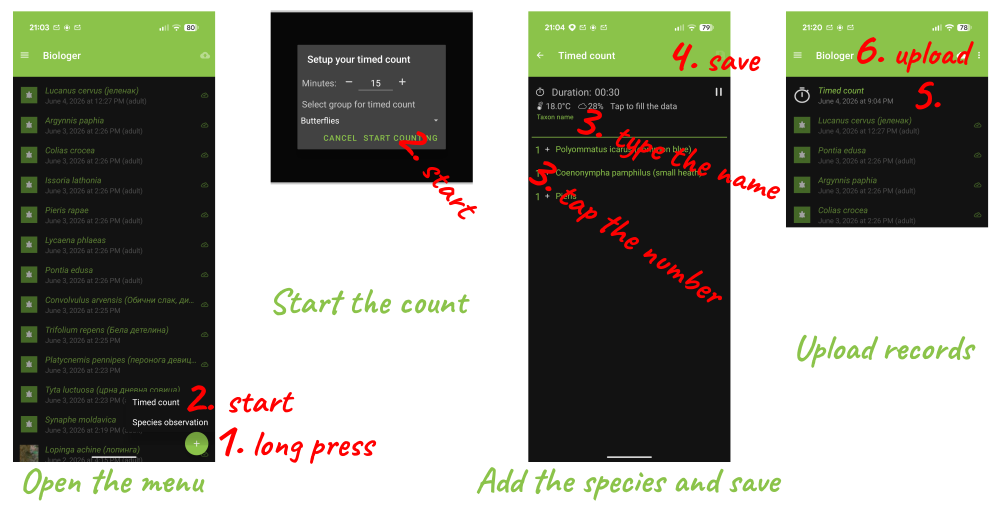
Adding the species is as easy as typing their Latin/native name. If the species is already on the list, just tap the number on the left side to add another specimen to the count. You can tap the species name to open all the species record along the count, edit the entries, add photos or delete accidental records.
When you make a pause, just click the pause button to stop the timer. This is useful if you are not sure what species is flying nearby and you would like to take a photo for identification. Our editors will check the data and help you identify the encountered species.
After 15 minutes, an icon for saving the count will appear in the top-right corner. Just recheck all the data, save it and send it to the server.